
Text to image · Photo editing · AI video
Seedream 5.0 AI Image Generator
Create images from a text prompt, edit photos with a sentence, and turn pictures into short videos, all in your browser.
- 20 free credits on signup (2 images)
- No credit card needed
- One-click Google sign-in
- Image + video in one place




What you can make with Seedream 5.0
Three tools that cover the whole flow, from a first image to edits and video.
Text to image
Describe a scene, a product shot or a poster and get a finished image. 7 aspect ratios including 1:1, 16:9 and 9:16, up to 4K on supported models.
Photo editing
Upload a photo and say what to change: swap the background, recolor an outfit, add or remove objects, or restyle the whole picture.
AI video
Turn a prompt or a still image into a 4–12 second clip with Seedance 1.0 Pro Fast or Seedance 1.5 Pro, from 480p to 1080p.
Photo editing examples
Restyle, recolor, extract, add, replace, change an expression, remove, re-pose and swap the background. Each pair shows the original on the left and the edit on the right.
Edit a photo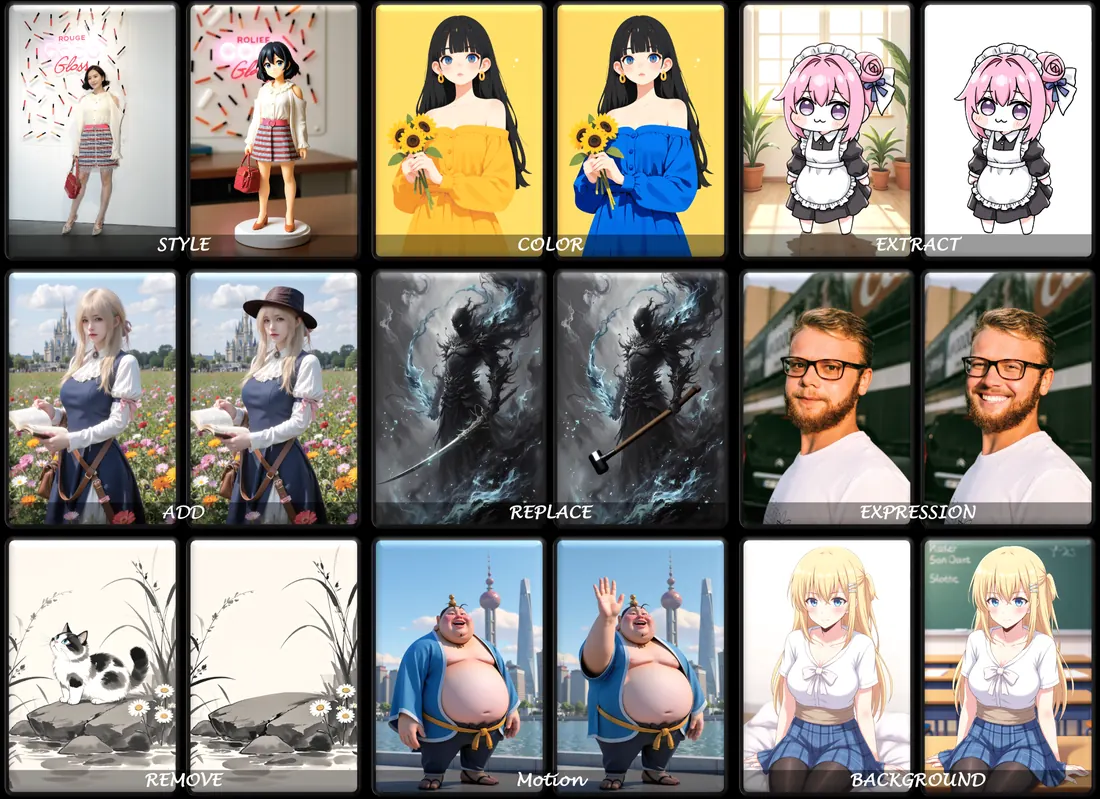
Need ideas?GPT Image 2 prompt galleryMiniMax H3 prompts
How it works
- 1
Write a prompt or upload a photo
Describe the picture you want in English or Chinese. To edit or animate, start from an image.
- 2
Pick a model and size
Seedream 5.0 is the default. Switch models any time, then choose the aspect ratio, resolution or video length.
- 3
Generate and download
Results are saved to My Creations so you can come back and download them. Failed generations are refunded automatically.
Pricing
Try it free with 20 signup credits, then pick a plan. A standard image costs 10 credits.
- 500 credits every month
- About 50 standard images
- 2,000 credits every month
- About 200 standard images
- 6,000 credits every month
- About 600 standard images
Frequently asked questions
What is Seedream 5.0?
Seedream 5.0 is an online AI image generator. Type a prompt to create an image, upload a photo and describe the edit you want, or turn text and images into short videos. Everything runs in the browser, with nothing to install.
Can I try it for free?
Yes. New accounts get 20 free credits, enough for 2 standard images, and no credit card is needed. Sign up with Google and the credits arrive right away; with email they are added once you verify your address.
How many credits does an image cost?
A standard Seedream 5.0 image costs 10 credits. Models such as Seedream 5.0 Lite, NanoBanana 2, Ultra and GPT Image 2.5 cost 20 credits, and 4K output on Ultra or NanoBanana 2 costs 40. The exact cost is shown on the Generate button before you start.
Can it make videos?
Yes. Text to Video and Image to Video use Seedance 1.0 Pro Fast and Seedance 1.5 Pro. Seedance 1.0 Pro Fast is priced by length and resolution, starting at 8 credits for a 4 second 480p clip; Seedance 1.5 Pro costs 80 credits per video.
Do failed generations use up credits?
No. Credits are reserved when a task starts and returned automatically if it fails or is canceled.
What plans are available?
Basic is $9.90/month for 500 credits, Pro is $29.90/month for 2,000 credits and Max is $79.90/month for 6,000 credits. Yearly billing saves up to 50%. Payments are in USD through Stripe and you can cancel anytime.
Make your first image now
Sign up and get 20 free credits. No credit card, ready in a minute.